Partner of Record (POR) Validation Changes

Important Notice for Microsoft Resellers
Microsoft is updating the API and UI in Partner Center to ensure distributors assign active, compliant indirect resellers as CSP Partner of Record (POR) for subscription orders to ensure compliance with CSP POR policies.
Starting September 1, 2025, the Microsoft system will check if the reseller is compliant with the reseller agreement terms on every order attempt. If requirements are not met with the MPN ID given, an error message will be displayed, and the order will not be processed. Resellers must meet the requirements listed below for successful POR validation to avoid potential service disruptions and loss of incentive and admin privileges.
Take action now to ensure a smooth transition when changes occur. Subscription orders will fail until a valid CSP POR is associated. Resellers must meet the requirements for successful POR validation to avoid service disruptions.
If any of these conditions are not met, you will be unable to transact with Microsoft. For any questions, reach out to your TD SYNNEX Microsoft contact.
June 2025 announcements - Partner Center announcements | Microsoft Learn
Steps to find your Partner Location Account (PLA) MPN ID number associated to CSP.

The MPN under "CSP" must be a Partner Location number and this is the number that needs to be provided to your distributor for purchasing CSP.
If your CSP number is the same as your Partner Global number, then you will need to fix/change this. Click on the pencil icon to change the association to a partner location account number. Doing this means you will need to update the TD SYNNEX platforms with the new CSP MPN number. You will also need to re-establish a reseller relationship with ALL your customers in your Microsoft partner center in the customer workspace.
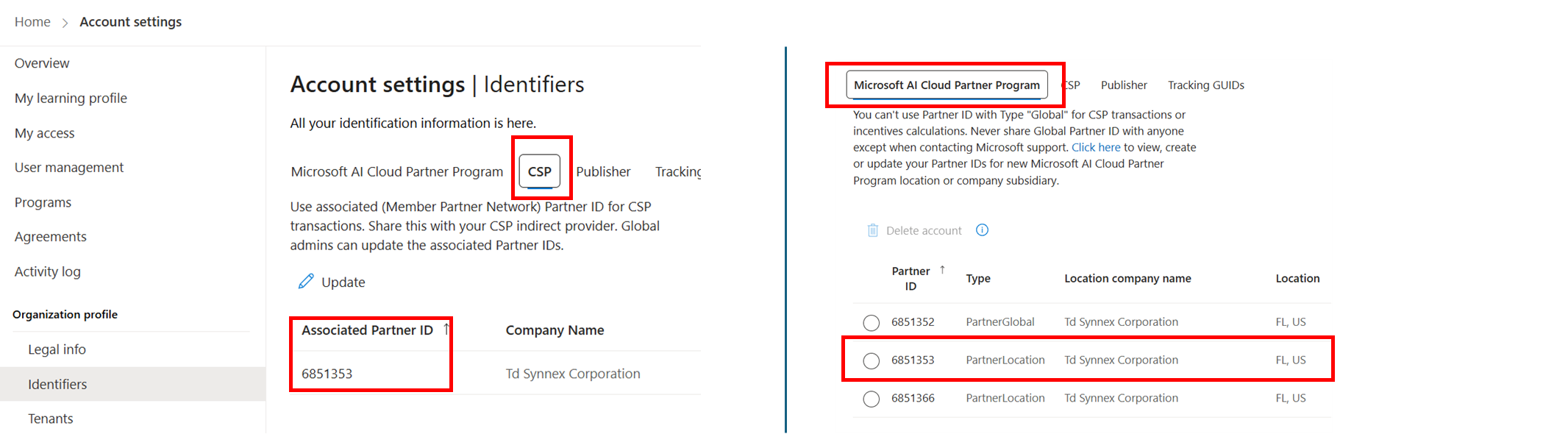
The CSP MPN ID we have in our platform needs it to be the same as what you see with the instructions above. If it is not it will need to be corrected.
If you see a different MPN ID in partner center, we will need to replace what we have in our platform and sync all your customers contracts. Please contact your TD SYNNEX Microsoft BD to update. This will ensure that you’re reported as the partner of record.
In Stellr:

In ION:
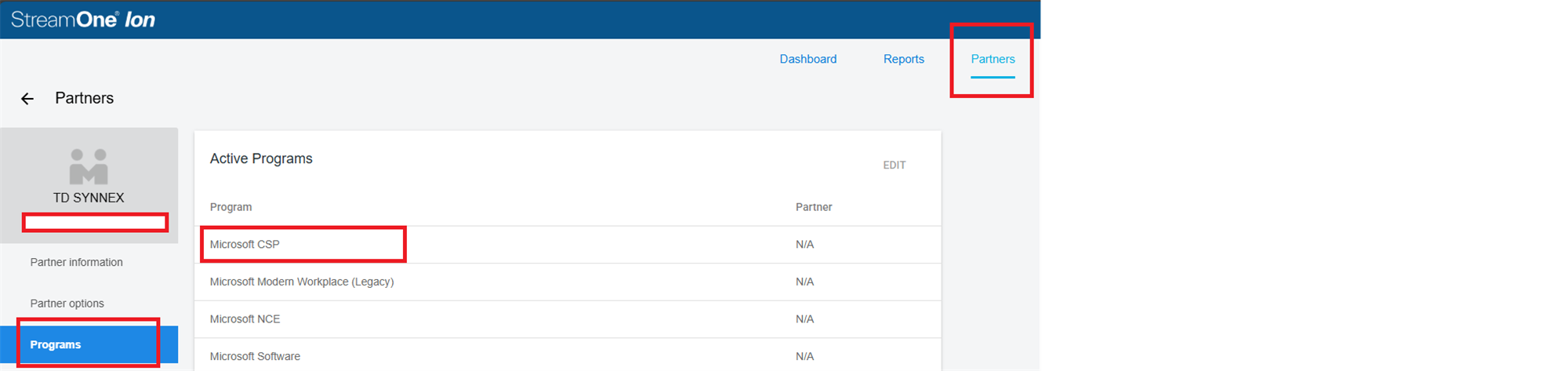
**** If these DO NOT MATCH please contact your TD SYNNEX Microsoft BD.***
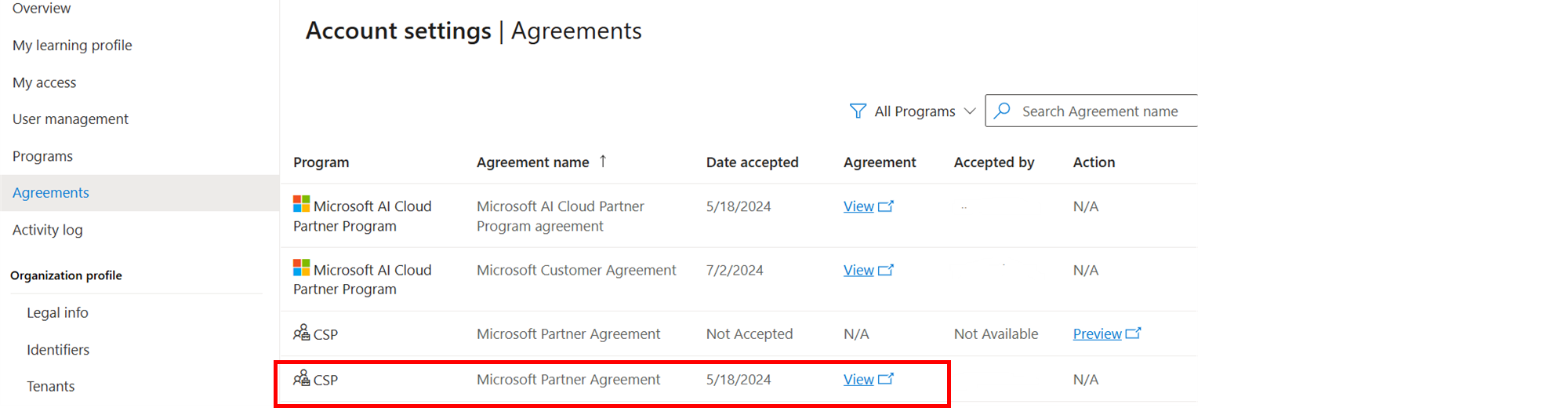
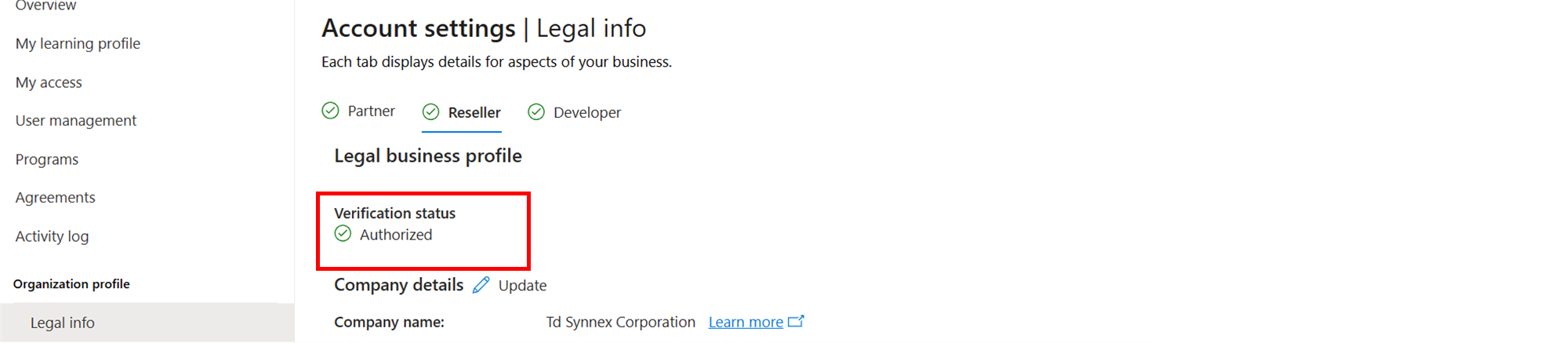


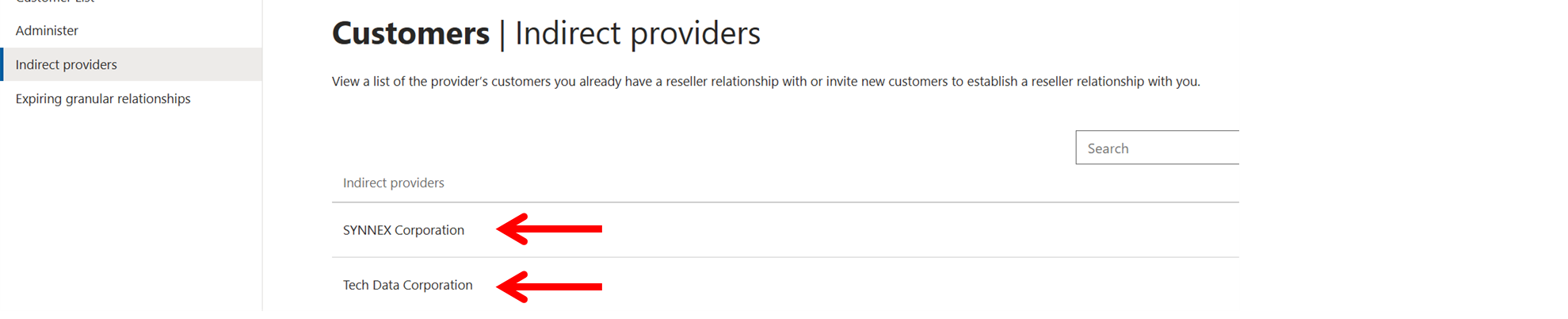
*** If you do not see TD SYNNEX listed here, then you will need to establish an Indirect Reseller Relationship with us. Please contact your Microsoft CSP Business Development Representative for the correct link. This link will vary by platform and country.
Q. How do I get licenses from Microsoft for internal use?
Microsoft offers four partner benefit packages that include a combination of Azure credits, Microsoft 365 Business Premium, Entra P2 and software licenses. Each package can be purchased max qty 1 each but are all stackable with each other and renewable each year. Links below will provide steps to purchase and what’s included in each package.
Solutions Partner benefits are only available for partners that qualify for a designation.
You can download the full Benefits Guide for
product licenses included.
Q. Can I purchase licenses in the CSP program for my internal use?
By contract, partners in the CSP program aren't allowed to sell Microsoft or third-party offers to themselves (as end-customers) or to their affiliate organizations (as end- customers).
The following link provides some more information on how CSP partners can work together and the supported partner transaction in the CSP program.
Supported CSP partner relationships - Partner Center | Microsoft Learn
Q. Do I need to re-establish my relationship with ALL my customers?
In your Microsoft Partner Center, if you have changed the MPN # that is associated with CSP, then you will need to request a new reseller relationship with all your customers. Go into your partner center customer workspace and add your customers with the new link. Be sure to choose TD SYNNEX as your indirect provider.
Contact your TD SYNNEX Sales Representative today at 1-800-268-1220 or 416-243-7336
© 2025 TD SYNNEX Canada ULC. All rights reserved. TD SYNNEX™, SYNNEX®, Tech Data®, and all associated logos, company products, services names and slogans are trademarks or registered trademarks of TD SYNNEX Corporation. Westcon, Comstor and GoldSeal are registered trademarks of WG Service Inc., used under license. Other names and marks are the property of their respective owners and licensors.
You are receiving this communication because you are part of a distribution list provided by TD SYNNEX Canada ULC to a third party marketing company. Should you unsubscribe from this distribution list, you will not be removed from all TD SYNNEX Canada ULC distribution lists, and you may continue to receive emails from us. You may need to unsubscribe more than once to be fully removed from all of our communications.
6911 Creditview Road
Mississauga, ON L5N 8G1
Canada
